Creating your first professional resume can feel overwhelming — especially when you don’t have years of work experience. The good news? Employers don’t expect a long job history from college students or recent graduates. They care about your skills, potential, education, and relevant experiences.
This guide covers the best resume format, layout rules, and real examples specifically for US-based students and new grads entering the job market in 2025.
Best Resume Format for College Students & Recent Graduates
For students and new graduates, the Combination Resume Format (also known as the hybrid resume format) is the most effective and job-winning option. It blends your strongest skills with your relevant experiences, making it ideal for anyone who is just starting their career.
Why This Format Works Best for Students & New Grads
Showcases your skills at the top
Because most students lack long-term work experience, leading with your technical and transferable skills gives recruiters an immediate understanding of what you bring to the table.
Minimizes the impact of limited job experience
A hybrid layout allows you to feature internships, academic projects, part-time jobs, and leadership roles without relying solely on a traditional work history.
Completely ATS-friendly
The combination format is structured with simple headings, clean text, and no complex design elements — ensuring that Applicant Tracking Systems can scan your resume without errors.
Lets projects and coursework shine
Academic projects, research experience, and capstone work often demonstrate more relevant skills than part-time jobs — and this layout makes them easy to highlight.
Avoid These Formats
- Functional resumes — often flagged or rejected by ATS because they hide timelines
- Over-designed templates — graphics, icons, columns, and images often break ATS parsing
A clean combination resume is the safest and strongest choice for a US-based job search.
Ideal Resume Structure for College Students & Recent Graduates
Below is the recommended section order for a polished, professional, recruiter-approved resume:
1. Header
Include the essentials:
- Full Name
- Phone Number
- Professional Email Address
- City + State (no full address needed)
- LinkedIn or Portfolio (optional, but highly recommended for business, design, marketing, or tech roles)
Tip: Make your name the largest text on the page for instant visibility.
2. Resume Summary or Career Objective
A short 2–3 sentence introduction summarizing your skills, experience level, and goals.
Tailor this section for each job you apply to.
Example:
“Motivated Business Administration graduate with internship experience in data analysis and digital marketing. Skilled in Excel, project coordination, and interpreting customer insights. Seeking to apply analytical and communication strengths to a high-performing marketing team.”
3. Skills Section
List a mix of hard skills (technical abilities) and soft skills (workplace strengths).
Always prioritize the skills that match the job description.
Examples:
- Excel
- Power BI
- Data Analysis
- CRM Tools
- Customer Service
- Problem-Solving
- Project Coordination
- Social Media Management
- Research
- Team Collaboration
4. Education Section
Include:
- Degree (e.g., B.A. in Psychology)
- University Name
- Graduation Year (or “Expected Graduation: 2025”)
- Relevant Coursework (optional but helpful for technical fields)
- GPA (optional — list only if 3.5+)
- Honors & Awards (Dean’s List, scholarships, academic recognition)
If your education is your strongest asset, place it high on the page — even above experience.
5. Relevant Experience
This section can include:
- Internships
- Part-time jobs
- On-campus positions
- Freelance work
- Volunteer roles
- Research experience
- Project-based work
Use bullet points focused on achievements, not task descriptions.
Start each bullet with a strong action verb, and quantify results when possible.
6. Projects (Highly Recommended)
Academic, personal, or capstone projects demonstrating relevant skills can significantly strengthen a student resume.
Examples include:
- Data analysis reports
- Marketing campaigns
- Coding projects
- UX/UI redesigns
- Engineering builds
- Business plans
Projects often show more practical ability than early job roles.
7. Leadership & Activities
Include:
- Student clubs
- Teams
- Volunteer work
- Campus organizations
- Greek life (if relevant and professional)
- Student government
- Academic groups
Leadership experience helps you stand out in a competitive job market.
8. Certifications (Optional but Valuable)
Relevant certifications help compensate for limited experience.
Examples:
- Google Analytics
- Google Project Management
- HubSpot Marketing
- Meta Social Media Marketing
- AWS Cloud Practitioner
- Microsoft Excel Specialist
Resume Examples for College Students
Strong Experience Example
Marketing Intern
Meta — Austin, TX
June–August 2024
- Created short-form social content that increased engagement by 28%
- Conducted competitor research to support new campaign strategies
- Assisted with A/B testing that optimized ad creatives for higher conversions
Project Example
Business Analytics Capstone Project
University of Texas
- Analyzed 5,000+ rows of sales data using Excel and Power BI
- Identified revenue trends that improved forecasting accuracy by 18%
- Presented data insights to faculty and industry reviewers
Leadership Example
Vice President, Student Marketing Club
- Organized monthly professional workshops for 120+ students
- Coordinated three large-scale campus marketing competitions
- Led outreach initiatives that increased membership by 40%
Resume Formatting Rules for Students & Recent Graduates
Margins
- Standard: 1 inch
- Tight layout: 0.75 inch
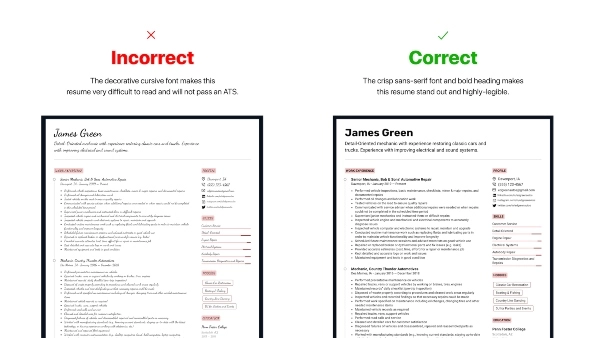
Font Choices (ATS-Safe)
- Calibri
- Inter
- Arial
- Helvetica
- Georgia
- Times New Roman (less modern but acceptable)
Font Sizes
- Name: 20–24 pt
- Headings: 14–16 pt
- Body Text: 10–12 pt
Spacing
- Line spacing: 1.0–1.15
- 6–10 px above section headings
- 4–6 px between bullet points
Resume Length
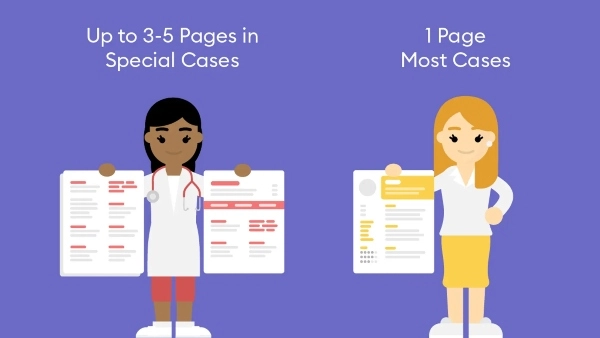
One page only — the standard for all students and new graduates
Layout Tips
- Use bullet points instead of paragraphs
- Keep everything left-aligned for readability
- Use one accent color at most (blue or dark gray works best)
- Avoid photos, icons, tables, columns, and graphics
- Export as PDF unless the job specifically requests DOCX
A clean resume layout helps both ATS systems and human recruiters instantly recognize your value — even if you have limited experience.
What to Do If You Have No Work Experience
Even if you’ve never had a formal job, you can still create a strong, competitive resume. Employers hiring students understand that you’re just starting your career — what matters most is your potential, transferable skills, and your ability to contribute.
Here’s what to emphasize:
Academic Projects
Projects are one of the best experience substitutes for students. They show:
- Problem-solving ability
- Technical skills
- Team collaboration
- Research and analytical thinking
Be specific about tools you used (Excel, Python, Power BI, Google Analytics), your role on the project, and any measurable results.
Coursework
If you’ve completed relevant classes, list them to demonstrate foundational knowledge.
Examples:
- “Digital Marketing Strategy”
- “Business Analytics”
- “Database Management Systems”
- “Social Psychology”
This helps recruiters understand your academic strengths and areas of focus.
Campus Roles
On-campus involvement counts as real experience. Include roles such as:
- Resident Assistant
- Peer Mentor
- Club Officer
- Event Coordinator
- Student Ambassador
- Tutoring or academic support roles
Highlight leadership, communication, organization, and responsibility.
Volunteer Work
Volunteer experience can show commitment and reliability. Use it to highlight:
- Teamwork
- Customer service skills
- Organizational skills
- Initiative in community involvement
Treat volunteer roles like real jobs — with achievement-focused bullet points.
Skills
Students often underestimate the value of their skills. Add:
- Software (Excel, Canva, Power BI, Photoshop, MATLAB)
- Tools (CRM systems, social media platforms, SQL, Figma)
- Soft skills (adaptability, time management, communication)
Even without job experience, a strong skillset can help you stand out.
Common Mistakes Students Should Avoid
Many student resumes fail because of formatting or content issues — not because the candidate lacks ability. Avoid these mistakes to ensure your resume looks polished and professional:
Using generic summaries: Statements like “Hardworking student seeking an opportunity…” add no value. Always tailor your objective to the role.
- Listing every class you’ve ever taken: Only include relevant coursework that supports your application.
- Adding high school information: Remove high school details unless you’re a freshman with no college achievements yet.
- Using overly decorative templates: Fancy designs, graphics, icons, and text boxes can break ATS and hurt readability.
- Writing long paragraphs: Recruiters skim. Bullet points are easier to read and more effective.
- Typos and inconsistent formatting: These mistakes signal lack of attention to detail — a major red flag.
- Saving your resume as an image: Always submit a PDF so the layout stays intact and ATS can read it.
ATS Tips for College Student Resumes
Applicant Tracking Systems (ATS) filter resumes before a human ever sees them.
To ensure your resume passes:
Use clear, standard section headers:
- Summary
- Skills
- Education
- Projects
- Experience
- Certifications
ATS scans for these terms exactly.
Include job-related keywords
Pull keywords directly from the job posting — software tools, skills, job titles, and industry terms.
Stick to professional fonts
Calibri, Inter, Arial, Times New Roman, or Helvetica.
Keep your format simple and text-based
Avoid:
- Icons
- Shapes
- Columns
- Graphics
- Tables
These elements can confuse ATS parsing and cause your resume to be rejected.
Final Checklist Before You Submit Your Resume
Before sending your resume to an employer, run through this list:
- One page only: Recruiters expect student resumes to be concise.
- Tailored to the job: Customize your summary, skills, and projects for each application.
- Uses strong action verbs: Examples: Created, Led, Improved, Developed, Organized, Produced, Analyzed.
- Includes numbers where possible: Metrics make achievements more credible and impressive.
- Layout is clean and ATS-friendly: Simple fonts, consistent formatting, and no design distractions.
If every box is checked, your resume is polished, professional, and ready to submit.
Final Answer: How College Students Should Format a Resume
For U.S. college students and recent graduates, the best resume format in 2025 is:
- Combination (Hybrid) Format — highlights skills first, then experience
- One-page layout — concise and focused
- Clean, modern, ATS-safe design
- Skills, projects, and education emphasized at the top
- Achievement-driven bullet points with data
This structure showcases your potential, even if you don’t have years of work experience. With the right formatting and content, you can stand out confidently in today’s competitive job market.