
Most websites I audit share the same symptom: the articles are thorough, the keywords are right, and yet nothing ranks. Open Search Console and you see most posts sitting at a handful of impressions — some never indexed at all, months after publishing.
The cause usually isn't the writing. It's that the articles stand alone — no post links to any other post. Googlebot lands on the homepage, walks the menu, and stops there. Anything buried deeper has no path leading to it.
Internal linking is what fixes this. And the best part: it's an SEO technique you can do entirely yourself, for free, without depending on anyone.
What is internal linking?
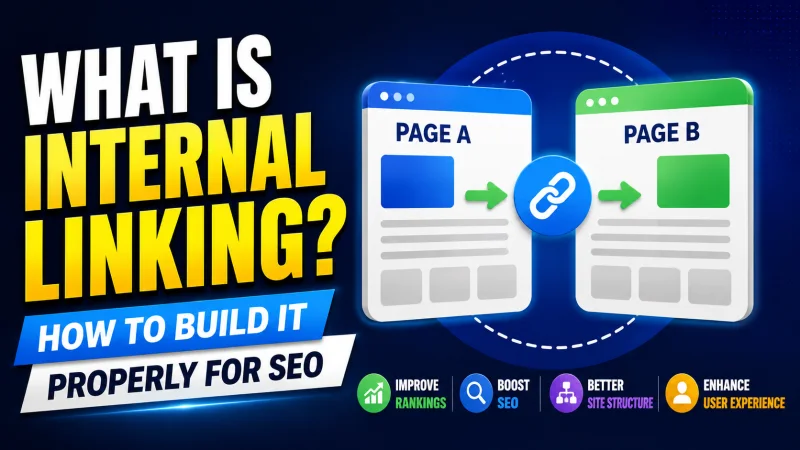
An internal link is a link that goes from one page to another page within the same domain. You're reading this on kiemtientuweb.com, so every link here pointing to another kiemtientuweb.com page is an internal link.
The table below makes the distinction clear:
| Link type | From | To | Who controls it |
|---|---|---|---|
| Internal link | Your website | Your website | You, completely |
| Outbound link | Your website | Another website | You |
| Backlink | Another website | Your website | Someone else |
Look at that last column. Backlinks depend on other people — you have to ask, trade, or buy them (and buying backlinks is risky). Internal links are different: you decide everything, build as many as you want, and change them whenever you like.
This is why I always tell clients to get internal linking right before thinking about backlinks at all.
Why internal linking matters
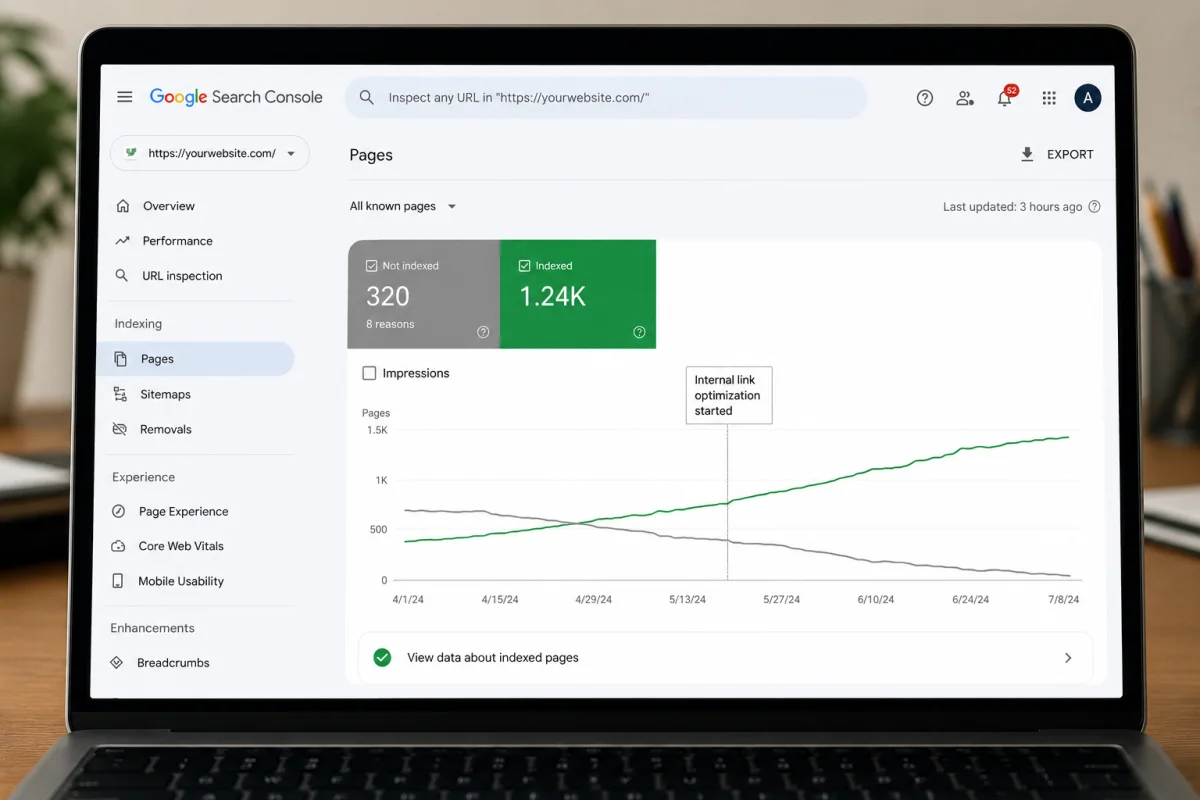
It helps Google find and index your posts
Googlebot discovers a website by following links. It arrives at the homepage, follows whatever links it finds, and spreads outward from there.
If a post has no links pointing to it — what SEO calls an orphan page — then the only way Google learns it exists is through the sitemap. And a sitemap is a hint, not a guarantee of indexing.
Across the projects I've worked on, this is the number one reason a post sits unindexed a month after publishing.
It spreads authority between pages
A homepage usually attracts more backlinks than anything else on a site, which makes it the strongest page you have. When the homepage links to an internal post, part of that strength passes along.
The mechanism works as a chain: strong page A links to page B, page B receives a share and passes some on to page C. That's how posts buried deep still get a chance to rank instead of being forgotten.
You don't need to understand the algorithm to apply this. Just remember one rule: the more important a post is, the more other posts should link to it.
It tells Google what each post is about
The text you wrap a link around — the anchor text — is a signal that tells Google what the destination page covers.
When several posts use anchor text related to "website speed optimisation" to point at one article, Google gradually reads that article as your site's main document on the topic.
It keeps readers on your site longer
This benefit gets mentioned less often, but the effect is real. Someone finishes a post, sees a link to a related one, clicks through — time on site goes up, bounce rate goes down.
For a site earning from ads, a visitor who views three pages instead of one means triple the revenue from that same visit.
Types of internal links on a website
Not every internal link carries the same weight. Here are the main types, ordered by how much they matter for SEO:
1. Links inside the article body (the most valuable)
These are worth the most, because Google reads the surrounding sentence to understand the context. A link sitting inside a paragraph about the same topic carries far more signal than one stranded at the bottom of the page.
2. Navigation links (menu, sidebar)
The main menu points to your most important pages. These links appear on every page, so they distribute authority steadily — but because they repeat everywhere, their topical signal is weaker than an in-content link.
3. Breadcrumbs
A trail like Home › SEO › What is internal linking helps both readers and Google understand where a page sits in your structure. Breadcrumbs can also appear directly in search results if you mark them up with the right schema.
4. Related posts
The suggestion block at the end of an article. Good for the reader, but when the system picks automatically it sometimes surfaces posts that aren't genuinely related. For your important articles, choose by hand.
5. Footer links
The lowest SEO value, because they repeat across the entire site and sit where few people read. Fine for policy, terms and contact pages.
How to build internal links properly
Step 1: Decide which posts are pillars and which are clusters
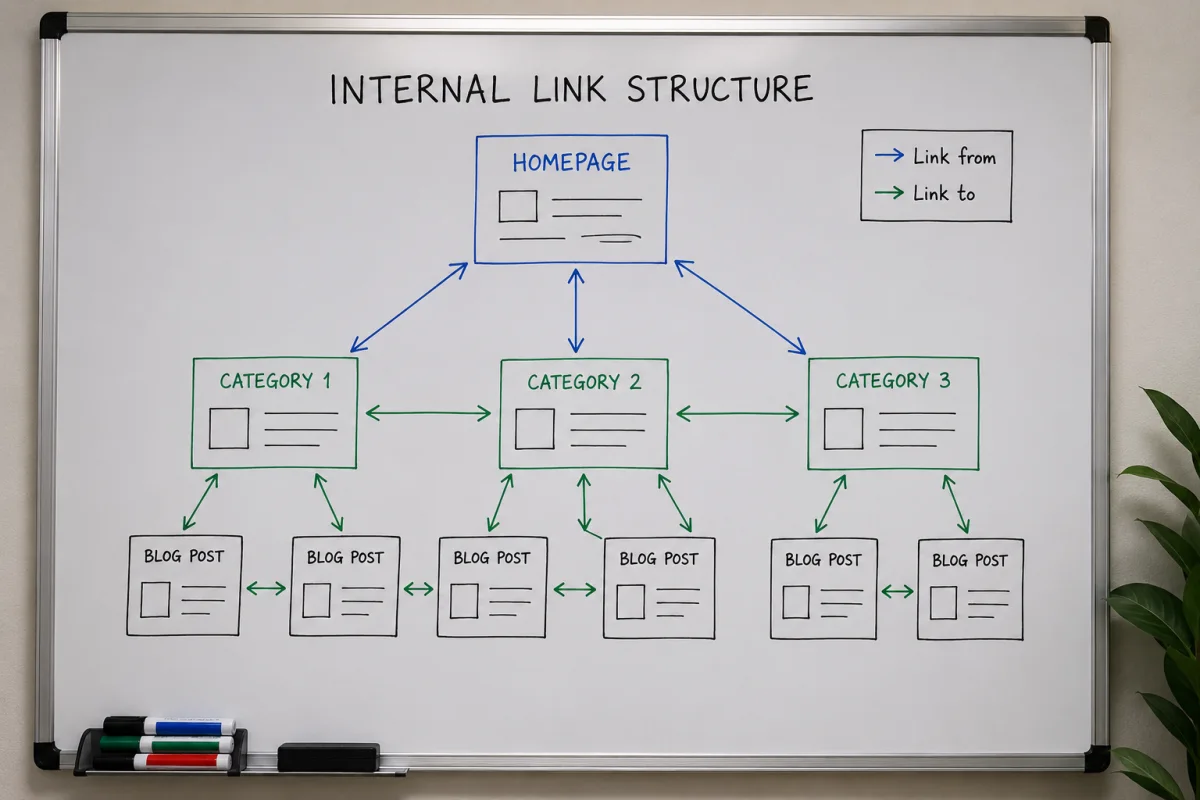
Before you place a single link, you need to know which post outranks which in importance. The most common and effective structure is the topic cluster:
- Pillar post — a broad overview of a large topic, usually 3,000–5,000 words, covering every angle.
- Cluster posts — each one goes deep on a single narrow aspect of that topic.
The linking rules in this model are simple:
- Every cluster post must have at least one link back to the pillar.
- The pillar links out to all of its cluster posts.
- Cluster posts link to each other only when the content genuinely overlaps.
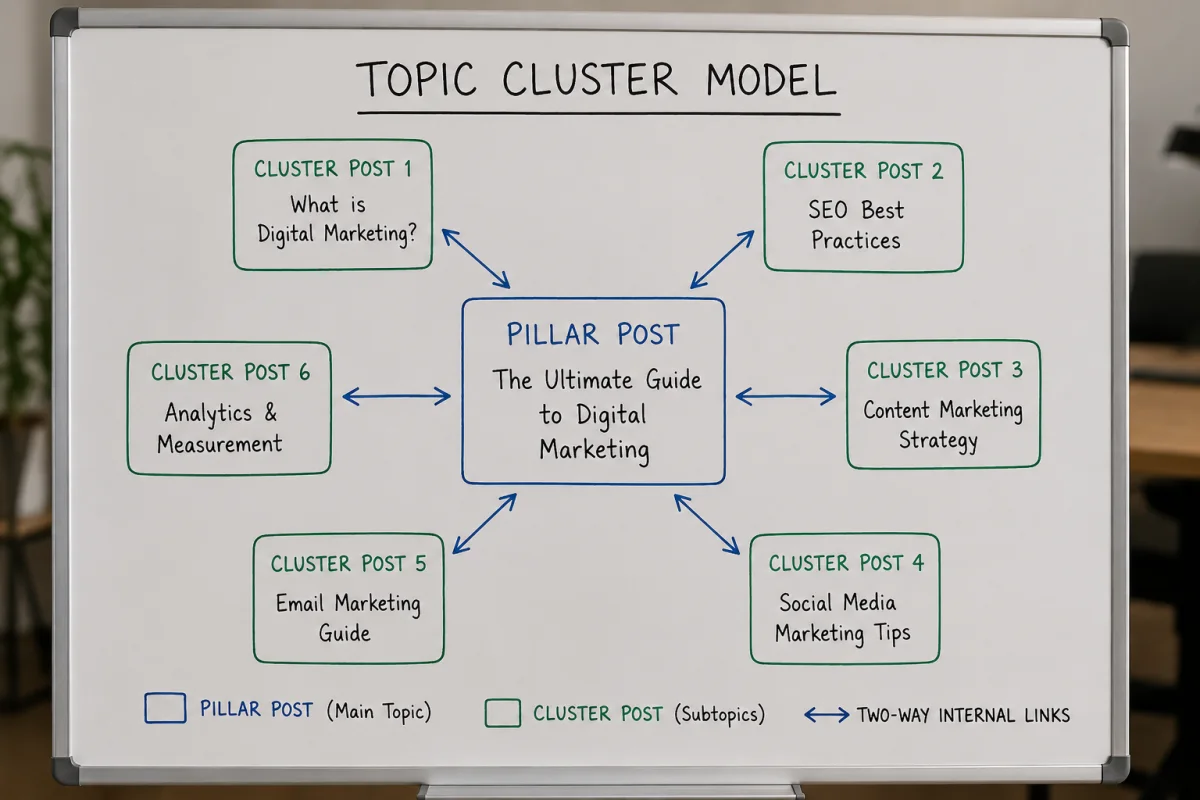
This tells Google your site has real depth in one area, instead of a scattering of unrelated pieces.
Step 2: Write anchor text that says something
This is where most people go wrong — and it's also the easiest thing to fix.
| Write this | Not this | Why |
|---|---|---|
| "how to add schema markup to your website" | "here" | Google has no idea what the destination covers |
| "guide to optimising Core Web Vitals" | "read more" | A wasted chance to pass a topical signal |
| "our article on XML sitemaps" | "click this link" | Poor reading experience, zero information |
Three rules for anchor text:
- Describe the destination. A reader should be able to guess what's on the other side without clicking.
- Make it read naturally. If you have to bend a sentence to squeeze a keyword in, that's a sign you're over-optimising.
- Vary it. Different posts pointing at the same target should use slightly different anchor text. The same exact phrase repeated dozens of times doesn't look natural.
Step 3: Place links where they carry weight
Position inside the article matters:
- A link inside a paragraph is worth more than one in a list at the end.
- Links appearing early in the article tend to be valued above links at the bottom.
- Don't dump every link into a "related posts" block and call the job done.
Step 4: How many links is enough?
There's no fixed number, and anyone quoting an absolute figure is oversimplifying. But here's the practical guide I still use:
| Article length | Sensible number of internal links |
|---|---|
| 800 – 1,200 words | 3 – 5 links |
| 1,500 – 2,500 words | 5 – 8 links |
| 3,000 words and up | 8 – 12 links |
What matters more than the count: every link has to be genuinely useful to the person reading. If you're straining to find somewhere to insert one more, you're working in the wrong direction.
Step 5: Update old posts when you publish a new one
This is the step skipped most often, and the one that makes the biggest difference.
Every time you publish something new, go back to two or three related older posts and add a link to it. Skip this and the new post becomes an orphan page — nothing leads to it except the sitemap.
The quick way to do it: search Google for site:yourdomain.com related keyword to list your older posts on that topic, then insert links where they fit.
6 common internal linking mistakes
Mistake 1: Meaningless anchor text
What it looks like: using "here", "read more", "click here" as anchor text.
The cost: you lose the topical signal to Google entirely.
The fix: rewrite the anchor text so it describes the destination.
Mistake 2: Orphan pages — posts nothing links to
What it looks like: a post published long ago with no other post linking to it.
The cost: Google indexes it slowly, or not at all.
The fix: find two or three related posts and add links pointing to it.
Mistake 3: Links pointing at 404 pages
What it looks like: you changed a post's URL and forgot to update the links in older articles.
The cost: wasted crawl budget, and readers hitting an error page.
The fix: set up a 301 redirect from the old URL to the new one, and repair the original links in your posts.
Mistake 4: Cramming in too many links
What it looks like: two or three links in every paragraph, until the article reads like a directory.
The cost: value gets split thin and the reading experience suffers.
The fix: keep the links that are genuinely relevant and remove the rest.
Mistake 5: Linking to unrelated pages
What it looks like: an SEO article linking to a recipe post purely to raise the link count.
The cost: Google receives confused signals about what your site is about.
The fix: only link when the reader actually needs that page.
Mistake 6: Adding nofollow to internal links
What it looks like: putting rel="nofollow" on internal links, usually from a misunderstanding about "sculpting PageRank flow".
The cost: you block the flow of value inside your own website.
The fix: remove nofollow from every internal link. The attribute is for sponsored links and outbound links you can't vouch for — not for links within your own site.
How to audit the internal links on your site
Use Google Search Console (free)
Start here, because it shows you what Google actually sees:
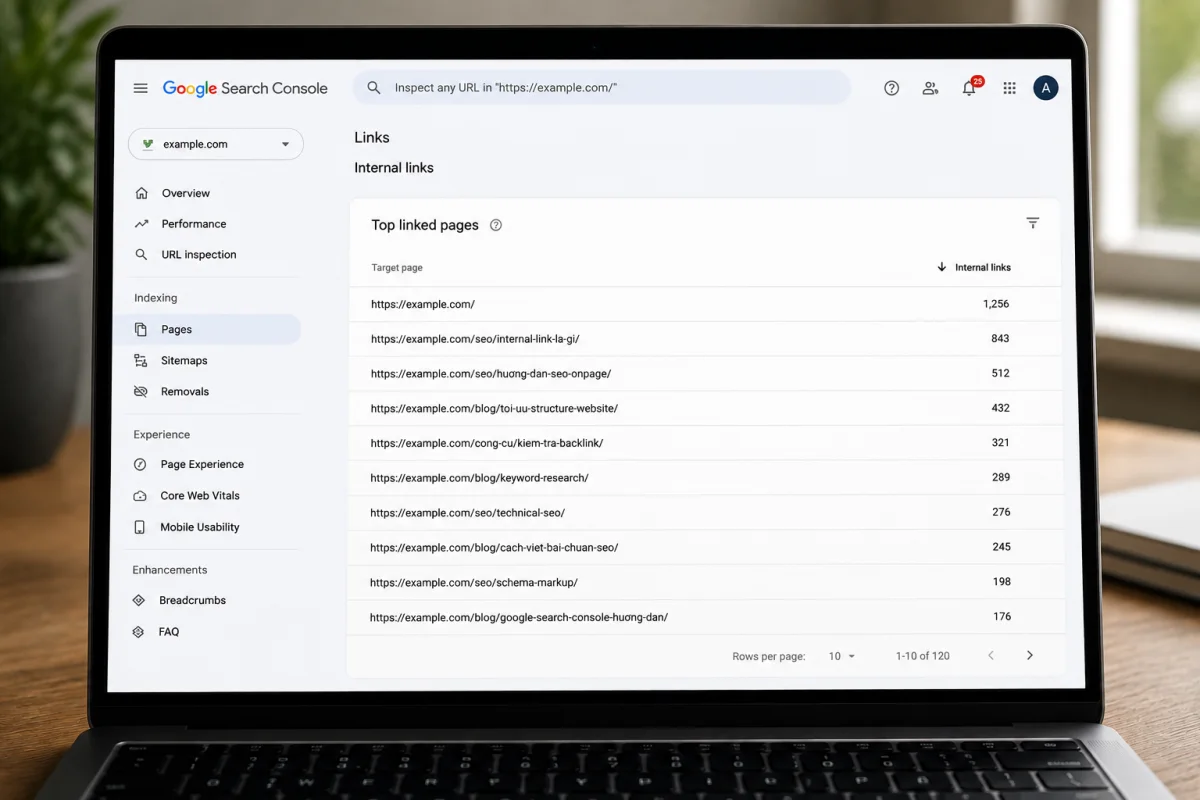
- Open Search Console and select your property.
- In the left menu, choose Links.
- Look at Internal links — pages ranked by how many internal links point to them.
How to read it: any important page sitting near the bottom of that list is exactly where you need to add links now.
Use a crawler
Screaming Frog crawls up to 500 URLs for free, which is plenty for a small or mid-sized site. After a crawl you can find:
- Orphan pages (when combined with Search Console data).
- Broken links returning 404.
- Crawl depth for each page — how many clicks from the homepage it takes to reach it.
On depth, the general rule is that every important page should sit within three clicks of the homepage. A page that takes five or six clicks to reach usually reads to Google as unimportant.
Check by hand on a small site
Under 50 posts, the fastest approach is a spreadsheet: column A lists your posts, column B records which posts currently link to each one. Do it once and the neglected posts become obvious immediately.
Frequently asked questions
Do internal links affect rankings?
Yes. Internal links help Google find a page, understand its topic, and judge how important it is within your site. That said, this is one ranking factor among many, not the deciding one. Good content is still the foundation.
Should I use nofollow on internal links?
No. The nofollow attribute is meant for sponsored links or outbound links whose quality you can't vouch for. Adding it to an internal link simply blocks the flow of value inside your own website.
How many internal links should one article have?
There's no fixed number. A 1,000-word post typically carries 3–5 links; a 3,000-word post around 8–12. The principle matters more than the count: every link has to be useful to the person reading.
Do menu and footer links count as internal links?
They do, but they're worth less than links inside the article body. The reason is that they repeat on every page and carry no individual context for Google to read a topic from.
Should I link to the same post several times in one article?
There's no need. Google generally only counts the anchor text of the first link pointing to a given URL. Repeat links just make the article harder to read.
Internal links or backlinks first?
Internal links first. They're free, entirely under your control, and carry no penalty risk. Quality backlinks take time and usually arrive on their own once your content is good enough.
Where to start
If your site has articles that aren't ranking, do this before you think about backlinks:
- Open Search Console and go to Links → Internal links.
- Find the important posts that only have one or two links pointing to them.
- For each one, find two or three related older posts and add a link inside a paragraph where it fits.
- Review all your anchor text and replace every instance of "here" and "read more".
Internal linking won't show results in a week. But it's something you control completely, it costs nothing, and nobody can take it away from you — unlike bought backlinks or rankings that live at the mercy of an algorithm.