

This week I audited the robots.txt on this site and found a bug: the sitemap directive pointed at the www hostname while the site's canonical form has no www. Every time Googlebot fetches the sitemap, it eats an unnecessary redirect.
The more interesting part is what I decided not to do: I don't block the admin area or the internal search page in robots.txt, even though nearly every robots.txt template online recommends exactly that. The reason is a distinction most people have backwards: blocking crawling and blocking indexing are different things, and reaching for the wrong one produces the opposite of what you wanted.
This article covers that distinction, which tool to use when, and why using Disallow to remove a page from Google is a reliable way to keep it there.
Two different actions, routinely conflated
Before any syntax, separate two things a search engine does:
- Crawling is the bot fetching a URL's content. This is what
robots.txtgoverns. - Indexing is storing that URL so it can appear in search results. This is what
meta robotsgoverns.
They happen in sequence, but they don't depend on each other the way people assume. Google can index a URL it has never fetched, if enough links point at it from elsewhere. And Google can fetch a page and then decide against indexing it.
robots.txtsays "don't come in".noindexsays "come in, but keep this out of search results". To issue the second instruction, you must permit the first.
What robots.txt is
A plain text file at the root of your domain, at exactly /robots.txt. It tells bots which parts of the site they shouldn't fetch.
Three properties people overlook:
- Scope is per host.
https://example.com/robots.txtapplies only tohttps://example.com. Subdomains have their own file, and technically so does thehttpversion. - It's a request, not a barrier. Googlebot and the major crawlers comply. Content scrapers, vulnerability scanners, and anyone with a browser do not.
- It's public to everyone. Anyone can open your
/robots.txt. Listing sensitive paths there is handing out directions.
The syntax that matters
A minimal file, sufficient for a blog:
User-agent: *
Allow: /

Sitemap: https://example.com/sitemap.xml
The directives:
User-agent— which bot the following rules apply to.*means all of them. A bot obeys exactly one group: the one naming it specifically, falling back to*only if no such group exists.Disallow— a path that shouldn't be fetched. It matches by prefix, soDisallow: /newsblocks/newslettertoo.Allow— reopens a subtree inside a blocked area.Sitemap— an absolute URL to your sitemap. Independent of theUser-agentgroups, valid anywhere in the file, and read by every search engine.
Two special characters: * matches any sequence, $ anchors the end of a URL. So Disallow: /*.pdf$ blocks every URL ending in that extension.
When a URL matches several rules, the rule with the longer path wins — not the one listed first. On equal length, Allow wins. This catches people out:
User-agent: *
Disallow: /downloads/
Allow: /downloads/free/
All of /downloads/ is blocked except /downloads/free/, which is reopened because that rule is more specific.
The classic mistake: using Disallow to remove a page
The pattern repeats endlessly. A page shouldn't be in search results — a post-form thank-you page, a filtered listing, an outdated article. Someone adds a Disallow line and waits for it to disappear.
It doesn't. Usually it gets worse: the URL stays in results, but now without a proper title and with the description replaced by a note saying no information is available for the page.
The mechanism is obvious once the two concepts are separated. The noindex directive lives inside the page. To read it, Googlebot has to fetch the page. You just forbade fetching. So the removal instruction sits in a file Google isn't allowed to open.
The URL stays indexed because Google learned it exists from somewhere else: an internal link, a link from another site, or your own sitemap. URL known, content unknown — the result is a bare line in the search results.
The correct sequence for removing a page:
- Remove any
Disallowrule covering that URL. - Add
<meta name="robots" content="noindex">to the page. - Wait for a recrawl. To speed it up, run the URL through the URL Inspection tool in Search Console and request indexing — counterintuitive, but it's how you get the bot back to read the new instruction.
- Only once the URL has left the index, add a
Disallowif you still want to save crawl requests.
Step 4 is almost never necessary on a small site. Skip it without a specific reason.
A note on noindex inside robots.txt
For a while Google quietly honoured a Noindex: directive inside robots.txt, and plenty of older tutorials still teach it. Google stopped supporting it in September 2019.
If your file contains that line, it does nothing. It's also a quick way to date an SEO guide: anything still recommending Noindex: in robots.txt is old enough that the rest deserves verification too.
Meta robots and X-Robots-Tag
The meta tag goes in the <head>:
<meta name="robots" content="noindex, follow">The values worth knowing:
| Value | Effect |
|---|---|
index / noindex | Allow or forbid indexing. Absent any directive, index is the default. |
follow / nofollow | Whether to follow the links on the page. |
noarchive | Don't store a cached copy. |
nosnippet | Don't show a description in results. |
max-snippet:150 | Cap the description length. |
max-image-preview:large | Permit large image previews. Worth enabling on articles with good imagery. |
noimageindex | Don't index images on the page. |
On noindex, nofollow: reaching for it by default is a bad habit. For a page you want out of search results but which still links usefully onward — an internal search results page, for instance — use noindex, follow. The bot still follows those links to reach the underlying articles. That's how this site's search page is configured.
For non-HTML files — PDFs, images, downloads — there's nowhere to put a meta tag. Use an HTTP header instead:
X-Robots-Tag: noindexSet it at the server level or in application code. In Laravel you can attach it to the response of whatever route serves the file.
Which tool for which goal
| Goal | Correct tool |
|---|---|
| Remove an HTML page from search results | meta robots noindex, with crawling permitted |
| Remove a PDF or image from results | X-Robots-Tag: noindex header |
| Stop bots burning server resources on a URL branch | robots.txt Disallow |
| Hide content from people | Authentication. Not robots.txt, not noindex |
| Consolidate duplicate URLs onto one version | Canonical tag |
| Stop bots following one specific link | rel="nofollow" on that anchor |
What to noindex on a blog
A short list, and it should stay short:
- Internal search results pages. Content varies by query, has no standalone value, and can generate unlimited URLs. Use
noindex, follow. - Login and the whole admin area.
noindex, nofollow. Put the tag in the admin layout once and every page inside is covered. - Thank-you and confirmation pages. No reason for these to surface in search.
- Tag archives holding one or two posts. Too thin to be useful — though consolidating your tags is a better fix than noindexing them wholesale.
One case where you should not noindex: paginated category pages like /blog?page=2. They're the route bots take to older posts. Mark them noindex and over time Google also reduces how much it follows the links on them, making old articles harder to recrawl. Leave them as index, follow.
robots.txt is not a security tool
This deserves its own section, because the consequences outweigh every SEO mistake in this article.
Your /robots.txt is readable by anyone, no credentials required. Every Disallow line is a public announcement that something you'd rather nobody saw lives at that path. To anyone probing for weaknesses, it's a map.
That's why this site's robots.txt contains no rule for the admin path, even though that path has been renamed from the default. The admin area is protected by authentication and authorisation; staying out of search results is handled by the noindex tag in the admin layout. There's no need — and no reason — to mention it in a public file.
The principle: anything that genuinely must stay private goes behind authentication. If it just shouldn't rank, use noindex. robots.txt does neither job well.
When robots.txt genuinely earns its place
Having listed what it can't do, it's only fair to cover what it does well:
- Blocking infinite parameter URLs. Faceted filters on a listing page can generate thousands of combinations with no individual value. This is the most legitimate use.
- Blocking expensive endpoints that bots keep hitting — heavy internal search queries, data export paths.
- Declaring your sitemap to every search engine at once rather than just Google. I covered sitemaps in detail in the XML sitemap article.
For a blog with tens or a few hundred posts and no complex filtering, the four-line file at the top of this article is the whole job. Every additional Disallow is another chance to block something you didn't mean to.
How to verify
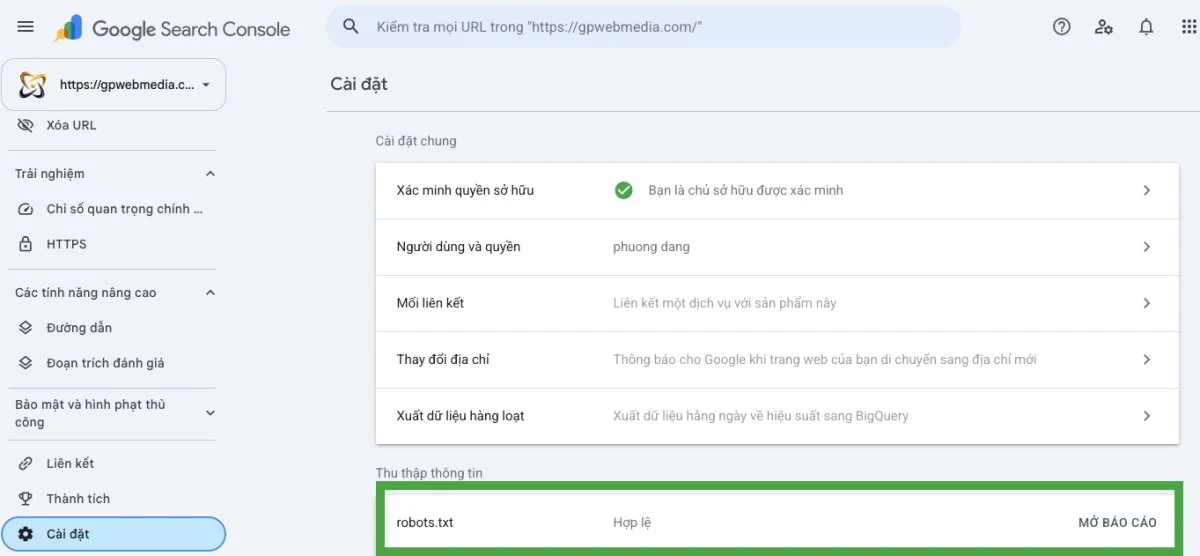
The standalone robots.txt Tester was retired. There are now two places to check inside Search Console.
The robots.txt report, under Settings. It shows when Google last fetched the file, its status, and the content Google actually read — useful when you've just edited the file and nothing seems to have changed.
URL Inspection, via the search box at the top. It answers the question that actually matters: is this URL blocked, and if so by which rule.
Quick checks from the command line:
# See what the server is actually serving
curl -s https://example.com/robots.txt

# Check whether a file returns an X-Robots-Tag
curl -sI https://example.com/downloads/file.pdf | grep -i robots

# Check the meta robots tag in the HTML
curl -s https://example.com/search | grep -i 'name="robots"'
Six common mistakes
| Mistake | Consequence |
|---|---|
Using Disallow to deindex a page | The page stays indexed and loses its title and description. |
Disallow and noindex on the same URL | The noindex is never read. The two cancel out. |
Shipping Disallow: / from a staging environment | The entire site drops out of Google. Rare, and the most expensive. |
| Blocking directories holding CSS and JavaScript | Google can't render the page and misjudges the mobile experience. |
| Listing admin paths in robots.txt | Publishes the exact thing you meant to obscure. |
Sitemap pointing at a redirecting URL | An extra 301 on every fetch. Precisely the bug I opened this article with. |
In short
Three sentences carry the whole article:
robots.txtcontrols fetching.meta robotscontrols appearing in search results.- To make a page disappear from Google, you have to let Google in to read the
noindex. Barring the door keeps it there. - Neither tool is security. If it must stay private, put it behind a login.
For most blogs, robots.txt is a four-line file you never touch again. If yours runs past ten lines, chances are you're solving the wrong problem with the wrong tool.