If you're sending out the same resume to every employer and hoping for different results, you're doing it wrong.
In today’s hyper-competitive job market, a tailored resume isn’t just nice to have—it’s essential. Recruiters spend only seconds scanning a resume, and they’re looking for one thing: relevance. In fact, many candidates are eliminated early simply because they fail to customize their resume for each role, a mistake frequently highlighted in our guide on resume mistakes that could cost you the interview.
So how do you tailor your resume for every job without rewriting it from scratch every time? Here’s a practical, step-by-step guide.
Step 1: Study the Job Description Carefully
The job posting is not just a list of requirements—it’s your blueprint for building a targeted resume. Think of it as a cheat sheet written by the employer themselves. They’re literally telling you what they want in a candidate. Your job is to listen—and then reflect that understanding in your resume.
Start by reading the job posting multiple times. Don’t just skim it. Print it out or copy it into a document and start highlighting. Focus on:
- Key responsibilities – What will this person do day-to-day? What functions are core to the role?
- Required and preferred skills – What hard and soft skills are explicitly listed? What certifications, tools, or methodologies are mentioned?
- Keywords or repeated phrases – If something appears more than once (e.g., "collaboration," "data-driven," "cross-functional"), that’s a clue that it’s important.
- Industry-specific tools or technologies – These often include platforms like Salesforce, Google Analytics, Python, HubSpot, Jira, or niche software tools.
Also pay attention to tone and emphasis. If the role stresses innovation, collaboration, or data-driven decision-making, your resume should echo that language. This approach aligns perfectly with best practices outlined in how to write a resume that employers actually read.
Pro Tip: If the company describes its culture or “ideal candidate,” take that seriously. Matching both skill requirements and company mindset can give you a decisive edge.
Step 2: Identify the Keywords to Include
Applicant Tracking Systems (ATS) are used by most employers today. These systems scan resumes and rank them based on how well they match the job posting. If you don’t use the right keywords, your resume may never reach a human recruiter—even if you're a perfect fit.
Let’s say the job description includes:
“Proficient in Salesforce, client onboarding, and CRM reporting.”
But your resume says:
“Experienced in managing customer relationships.”
While related, you're missing the exact terms the employer is screening for: “Salesforce,” “onboarding,” and “CRM reporting.”
To pass the ATS and appeal to recruiters:
- Use the exact phrases from the job post wherever appropriate.
- Place them in the professional summary, experience bullets, and skills section.
- Be honest and contextual. Don’t just dump keywords. Make sure they are backed by real experience.
Avoid keyword stuffing. Cramming your resume with phrases like “team player,” “detail-oriented,” or technical jargon that you don’t fully understand or haven’t used in practice will backfire. Instead, weave keywords naturally into your achievements and results.
For a deeper breakdown, follow this guide on how to optimize your resume for ATS.
Step 3: Customize Your Professional Summary
Your professional summary (or resume summary) sits at the top of your resume—and it’s prime real estate. This is your first and best opportunity to make a targeted impression.
Too many job seekers waste this section on vague, one-size-fits-all statements like:
“Experienced marketing professional seeking new opportunities.”
That tells the employer nothing about you or how you’ll meet their specific needs.
Instead, your summary should be:
- Tailored to the role
- Focused on value and impact
- Filled with relevant keywords
- Backed by specific experience or metrics
If you’re unsure how to structure it, review these strong resume summary examples with measurable achievements or explore when to use a summary versus an objective in our resume summary vs objective guide.
Step 4: Align Your Work Experience with the Role
This step is where real tailoring happens.
Read through the responsibilities in the job description and ask yourself:
Have I done this before? If yes, how can I show it?
Let’s say the job mentions:
- Developing marketing campaigns
- Managing budgets
- Collaborating with product teams
- Using performance data to refine strategies
Now look at your experience. Which projects match those tasks? Rewrite your bullet points to mirror the structure and language of the job description while staying truthful.
Generic bullet point:
- Managed company social media accounts.
Tailored version:
- Developed and launched social media campaigns aligned with product launch strategies, leading to a 45% increase in user engagement and a 12% lift in conversions.
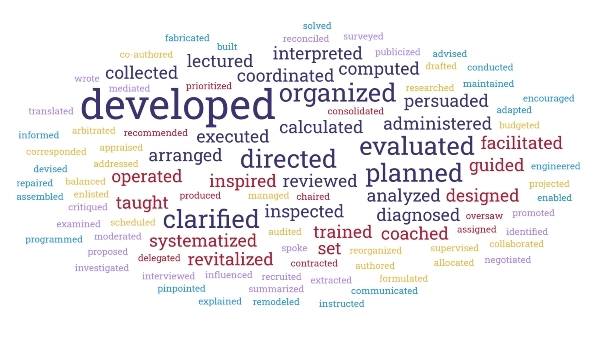
Strong, results-driven bullet points are even more effective when paired with powerful language. Use this curated list of action verbs for resumes to strengthen impact.
Step 5: Highlight Relevant Skills Only
Your skills section should be laser-focused on the abilities that matter for this role.
Many job seekers create long lists of tools and platforms—hoping to impress with volume. But relevance matters more than quantity. Tailor your list to match the job description.
If you’re applying for a data analyst position, highlight tools like:
- SQL
- Advanced Excel
- Tableau or Power BI
- Python (if used)
- Data modeling or visualization
Remove unrelated skills like “video editing” or “Photoshop” unless they directly relate to the job or add strategic value.
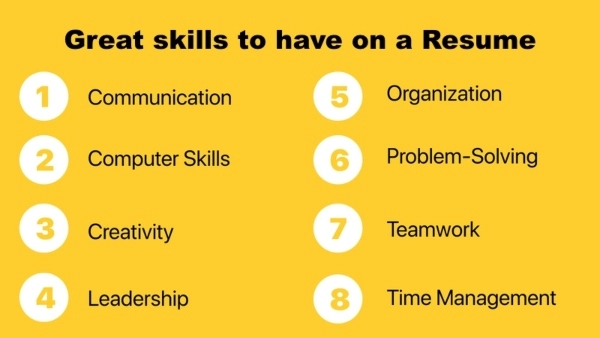
If you need guidance on what employers value most, this list of great skills to have on a resume can help you prioritize effectively.
Also, consider using categories or groupings to improve clarity, such as:
- Technical Tools: SQL, Python, Tableau
- Analytical Skills: Forecasting, Trend Analysis, A/B Testing
- Soft Skills: Communication, Collaboration, Time Management
Step 6: Reorder or Rename Sections Strategically
Most resumes follow a conventional order—but when tailoring, small layout changes can make a big impact.
Ask yourself: What matters most for this role? Then make sure those items appear higher on the page.
Examples:
- If the job values certifications like PMP, Google Analytics, or AWS, move your Certifications section above your Work History.
- If the employer is focused on specific technical skills, place the Skills section directly below your summary.
- If you're switching careers and your projects or education are more relevant than past job titles, bring those sections up.
You can even rename sections to align better with industry standards. For example:
- Rename "Projects" to "Relevant Projects"
- Rename "Experience" to "Professional Experience in Data Analysis"
These subtle changes help ensure that recruiters see what matters most first.
For formatting best practices, review this detailed resume format guide and tips on how to format a resume properly.
Step 7: Adjust Your File Name and Document Title
This detail is often overlooked—but it matters.
When you save your resume, use a clear, professional file name that includes your name and the position you’re applying for.
- Instead of: Resume.docx
- Use: Jane-Smith-Marketing-Manager-Resume.pdf
Also, if you’re submitting a Word document, go into "File > Info" and update the Document Title to include your name and job target. Recruiters and hiring managers sometimes see these titles in their file browsers—and a clear title adds a polished touch.
Bonus tip: Always save your final version as a PDF, unless the job posting specifically asks for Word format. PDFs preserve formatting across devices and systems.
Bonus: Create a Master Resume
Tailoring your resume for each job doesn’t mean writing a new resume from scratch every time. That’s unsustainable.
Instead, create a master resume—a document that includes everything:
- All your roles and responsibilities
- Every project you’ve worked on
- All achievements, quantifiable results, tools, and skills
When you’re applying for a new job:
- Copy the job description into a document
- Highlight relevant responsibilities, tools, and keywords
- Pull the most relevant content from your master resume into a new tailored version.
This approach saves time and aligns perfectly with strategies recommended in how to tailor your resume for every job.
Final Thought
Tailoring your resume isn’t optional—it’s often the difference between getting noticed and getting ignored. Relevance wins.
By applying these steps, you show employers that you understand their needs and are prepared to deliver value from day one.
Ready to put it all together? Try our Free Resume Builder to create tailored, ATS-friendly resumes in minutes—no guesswork required.